Tutorial: Writing a Manual Mapper part 2
This guide covers how to implement a manual dll mapper, which maps a dll into another processes memory using C++ and the Windows API.
Introduction
In the last part of this series we examined the important fields of the PE-header to manually map a DLL. In this series we shall examine an example implementation of such a manual mapper for 32-bit DLL’s. For brevity sake I will omit most error checking in this post but it will be in place in the source code.
Opening the DLL
The first step to mapping our DLL is loading its content into a buffer. Remember that the IMAGE_DOS_HEADER begins right at the first byte of our DLL. Thus we will cast this buffer to an IMAGE_DOS_HEADER structure to then fetch the e_lfanew field from it and get the IMAGE_NT_HEADERS structure.
HANDLE fileH = CreateFileA(PATH_TO_DLL, GENERIC_READ, 0, 0, OPEN_EXISTING, FILE_ATTRIBUTE_NORMAL, 0);
int fileSize = GetFileSize(fileH, 0);
IMAGE_DOS_HEADER* dosHead = (IMAGE_DOS_HEADER*)HeapAlloc(GetProcessHeap(), HEAP_NO_SERIALIZE, fileSize);
DWORD bytesRead = 0;
ReadFile(fileH, (LPVOID) dosHead, fileSize, &bytesRead, NULL);
IMAGE_NT_HEADERS* PEHeader = (IMAGE_NT_HEADERS*)((DWORD)dosHead + dosHead->e_lfanew);
With the IMAGE_NT_HEADERS in place we can easily access the OptionalHeader field of it. Let’s start by fetching all of the information we need from it first:
nSections = fileHeader->FileHeader.NumberOfSections;
IMAGE_SECTION_HEADER *sectionHeaders = (IMAGE_SECTION_HEADER*)((DWORD)&fileHeader->OptionalHeader + fileHeader->FileHeader.SizeOfOptionalHeader);
DWORD imageBase = fileHeader->OptionalHeader.ImageBase;
DWORD relocTableSize = fileHeader->OptionalHeader.DataDirectory[IMAGE_DIRECTORY_ENTRY_BASERELOC].Size;
DWORD relocTableRVA = fileHeader->OptionalHeader.DataDirectory[IMAGE_DIRECTORY_ENTRY_BASERELOC].VirtualAddress;
DWORD importTableSize = fileHeader->OptionalHeader.DataDirectory[IMAGE_DIRECTORY_ENTRY_IMPORT].Size;
DWORD importTableRVA = fileHeader->OptionalHeader.DataDirectory[IMAGE_DIRECTORY_ENTRY_IMPORT].VirtualAddress;
DWORD entryPointRVA = fileHeader->OptionalHeader.AddressOfEntryPoint;
DWORD imageSize = fileHeader->OptionalHeader.SizeOfImage;
The next things we need to do are the following:
- Allocate memory for our DLL in the target process
- Process our relocation table
- Load all sections into the target memory
- Process our import table
- Run our
DLLMain()in the target process
1. Allocate memory for our DLL in the target process
To allocate memory in our target process we first have to get a handle to it. This can be done with the Tool Help Library by importing tlhelp32.h. For this sake I wrote a function that gets us a handle by name:
HANDLE openProcessByName(const char* procName, WORD accessRights)
{
	HANDLE snapshot = CreateToolhelp32Snapshot(TH32CS_SNAPPROCESS, NULL);
	PROCESSENTRY32 entry;

	entry.dwSize = sizeof(PROCESSENTRY32);

	if (Process32First(snapshot, &entry))
	{
		do
		{
			if (!strcmp(entry.szExeFile, procName))
			{
				CloseHandle(snapshot);
				return OpenProcess(accessRights, 0, entry.th32ProcessID);
			}
		} while (Process32Next(snapshot, &entry));
	}
	return NULL;
}
CreateToolhelp32Snapshot(TH32CS_SNAPPROCESS, NULL) returns a snapshot of all processes currently running on the system. Process32First and Process32Next is used to enumerate the snapshot. Every time we call these they return a PROCESSENTRY32 structure for the corresponding process. We are only checking for the szExeFile field which holds the name of the executable image of the process (usually the .exe file’s name). As we find our target we will then open a handle to it using OpenProcess(accessRights, 0, entry.th32ProcessID) and return it.
In our main() function we can then call this function and allocate the needed memory like so:
procHandle = openProcessByName(trgt, PROCESS_ALL_ACCESS);
DWORD realBase = (DWORD)VirtualAllocEx(procHandle, NULL, imageSize, MEM_COMMIT | MEM_RESERVE, PAGE_EXECUTE_READWRITE);
procHandle tells the function VirtualAllocEx in which process we want to allocate memory, NULL says that we don’t care where this chunk of memory will be (we could set this to ImageBase but since it’s not guaranteed to get this address we have to implement relocation anyway), imageSize is how much we need, MEM_RESERVE is a flag to reserve the virtual address range and MEM_COMMIT to actually allocate physical memory for the reserved virtual address range (if you are not familiar with this, the virtual addresses are translated to physical addresses at some point and a process can only use virtual addresses for referencing memory). PAGE_EXECUTE_READWRITE sets the flags in the corresponding Page table entry(s) such that our memory can be read, written and executed.
2. Process our relocation table
Now that we know the real base of our image we can process the relocations. We could do this also in the target process but I decided to fix the addresses before we write the image into the target process. This could be helpful if we wanted to avoid calling VirtualAllocEx and write the loader into some spare space of another module at some point. But it could be slightly easier to fix the relocations in the target process. This is because the RVAs we are working with are only valid in the loaded image. Remember the offset of a section in the loaded image can differ from that on disk (i.e., PointerToRawData doesn’t have to equal VirtualAddress). For this purpose I wrote a small helper function:
DWORD calcFileAddress(const DWORD& RVA)
{
	int found = -1;
	for (int i = 0; i < nSections; i++)
	{
		if (RVA < (sectionHeaders + i)->VirtualAddress)
		{
			found = i - 1;
			break;
		}
	}
	if (found == -1)
		found = nSections-1;

	return RVA - (sectionHeaders + found)->VirtualAddress + (sectionHeaders + found)->PointerToRawData;
}
It simply calculates in which segment the RVA would lie if the file was mapped, then calculates the offset in that segment and adds it to the PointerToRawData. This gives us the address on disk. The only section this won’t work for is the certificate table as this table is not loaded into memory and thus the RVA is an offset into the file on disk. But since we don’t care about this one it does not matter.
Now with this little helper we can actually do some relocation. First let’s fetch our relocation table converting the RVA of it to an offset on disk with our helper and then calculate the delta by which we need to alter each address:
procHandle = openProcessByName(trgt, PROCESS_ALL_ACCESS);
IMAGE_BASE_RELOCATION *relocTable = (IMAGE_BASE_RELOCATION*)((DWORD)dosHead + calcFileAddress(relocTableRVA));
DWORD delta = realBase - imageBase;
Remember, each IMAGE_BASE_RELOCATION is followed by multiple relocation entries each being one word in size. Each entry can be defined by:
typedef struct RELOCATION_ENTRY
{
  unsigned Type : 4;
  unsigned Offset : 12;
};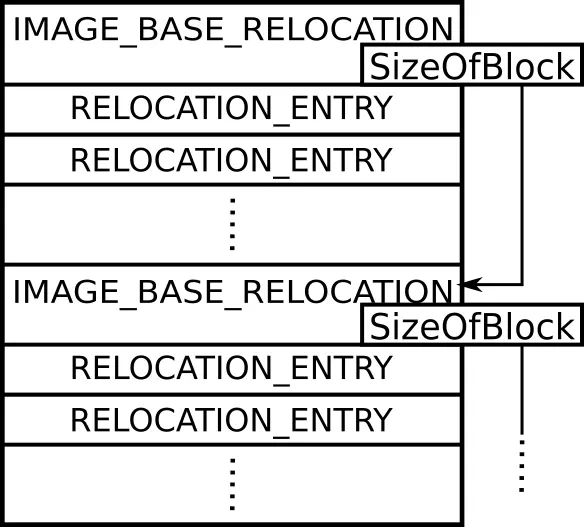
Right after these entries with an address, aligned to be a multiple of 4 bytes, comes the next IMAGE_BASE_RELOCATION. Thus we can loop through our IMAGE_BASE_RELOCATION’s in an outer loop and in an inner loop through all the entries following it. We can do this like so:
DWORD delta = realBase - imageBase;
relocTable = (IMAGE_BASE_RELOCATION*)((DWORD)dosHead + calcFileAddress(relocTableRVA));
curReloc = relocTable;
DWORD relocEnd = (DWORD)relocTable + relocTableSize;

for (; (DWORD)curReloc < relocEnd; curReloc = (IMAGE_BASE_RELOCATION*)((DWORD)curReloc + curReloc->SizeOfBlock))
{
	DWORD blockEnd = (DWORD)curReloc + curReloc->SizeOfBlock;
	RELOCATION_ENTRY *relocEntry = (RELOCATION_ENTRY*)((DWORD)curReloc + sizeof(IMAGE_BASE_RELOCATION));

	for (;(DWORD) relocEntry < blockEnd; relocEntry = (RELOCATION_ENTRY*)((DWORD)relocEntry + 2))
	{
		DWORD fixAddr = relocEntry->Offset + calcFileAddress(curReloc->VirtualAddress);
		switch (relocEntry->Type)
		{
		case IMAGE_REL_BASED_ABSOLUTE:
			break;

		case IMAGE_REL_BASED_HIGH:
			*(DWORD*)((DWORD)dosHead + fixAddr) = *(DWORD*)((DWORD)dosHead + fixAddr) + (delta & 0xff00);
			break;

		case IMAGE_REL_BASED_LOW:
			*(DWORD*)((DWORD)dosHead + fixAddr) = *(DWORD*)((DWORD)dosHead + fixAddr) + (delta & 0x00ff);
			break;

		case IMAGE_REL_BASED_HIGHLOW:
			*(DWORD*)((DWORD)dosHead + fixAddr) = *(DWORD*)((DWORD)dosHead + fixAddr) + delta;
			break;
		default:
			cout << "[ERROR] while relocating the image. The reloctype: " << relocEntry->Type << " is unknown to this mapper. You might have to implement it!" << endl;
			CloseHandle(procHandle);
			return 0;
			break;
		}
	}
}
The inner switch over relocEntry->Type determines how the address should be fixed. There are more types one can implement though if needed. They can all be found here. IMAGE_REL_BASED_ABSOLUTE means do nothing. IMAGE_REL_BASED_HIGH means fix the high word of the address, IMAGE_REL_BASED_LOW means the low word and IMAGE_REL_BASED_HIGHLOW means both (probably the most common one). Unfortunately we can’t do ++relocEntry in the inner loop. I fell for that one at first. C++ rounds bitfields to multiples of 32bits so relocEntry has a sizeof 4 bytes so we would skip 50% of the relocations which will surely crash our DLL. Thus we have to cast it to DWORD first to avoid pointer arithmetic.
3. Load all sections into the target memory
This is a little easier. We have already saved the number of sections nSections and a pointer to the first section header in sectionHeaders so we can loop over all sections and write them simply like this:
DWORD sectionHeaderEnd = (DWORD)(sectionHeaders + nSections);
	IMAGE_SECTION_HEADER* curSectionHead = sectionHeaders;

	for (; (DWORD)curSectionHead < sectionHeaderEnd; ++curSectionHead)
	{
		DWORD vAddr = curSectionHead->VirtualAddress + realBase;
		char name[IMAGE_SIZEOF_SHORT_NAME + 1];
		_memccpy(name, curSectionHead->Name, NULL , IMAGE_SIZEOF_SHORT_NAME);
		name[IMAGE_SIZEOF_SHORT_NAME] = '\0';
		cout << "[+] written " << name << " to "<< hex << vAddr<< endl;
		DWORD buffLoc = (DWORD)dosHead + curSectionHead->PointerToRawData;
		SIZE_T nBytesWritten;
		SIZE_T bytesToCopy = min(curSectionHead->SizeOfRawData, curSectionHead->Misc.VirtualSize);

		WriteProcessMemory(procHandle, (LPVOID)vAddr, (LPCVOID)buffLoc, bytesToCopy, &nBytesWritten);

		if (nBytesWritten != min(curSectionHead->SizeOfRawData, curSectionHead->Misc.VirtualSize))
		{
			cout << "[ERROR] writing to the target process." << endl;
			delete[] dosHead;
			CloseHandle(procHandle);
			return 0;
		}
	}
In every loop we grab the address of the first byte of the section in vAddr, the address in our file in buffLoc and calculate the bytesToCopy. Why we take the minimum here is explained in the previous part at the end of the Section Table section. Maybe we could also take sizeOfRawData here if we assume a section always has a unique page but taking the minimum works for sure.
4. Process our import table
Now that everything is in place we can start resolving the imports. Since our image is now located in our target process it is convenient to let this be handled by a small loader inside our target process. Though another way to do this would be calling CreateRemoteThread with LoadLibraryA() and GetProcAddress() for each Module and the functions we need from it. If we know that our target process has a thread that frequently enters an alertable state we could even use QueueUserAPC instead of CreateRemoteThread and pass it LoadLibraryA’s address. One could even go so far to only link dynamically against DLL’s that are known to be present in the target which would make the loader unnecessary.
Anyway we stick with the loader solution for now. This will be a small function whose sole purpose is to populate our Import Address Table (IAT) with addresses and load the libraries our DLL depends on. This function will be passed to CreateRemoteThread which also allows us to pass one pointer to that function. That’s why we need a struct written to our target containing all the information our loader needs as we can pass its pointer to our function then. I used the following struct for this:
using loadLibFun = HMODULE (__stdcall*)(LPCSTR);
using getProcAddrFun = FARPROC(__stdcall*)(HMODULE, LPCSTR);

struct parameters
{
	getProcAddrFun gPADFPtr;				//windows loads
	loadLibFun loadLibFunPtr;
	IMAGE_IMPORT_DESCRIPTOR* importTableP;
	DWORD imageBase;
	DWORD entry;
};
First of all the using statements are only there for nicer notation. getProcAddrFun and loadLibFun are aliases for function pointers that can hold the LoadLibraryA and GetProcAddress functions addresses. Since Kernel32.dll is loaded to the same modulebase in every process, these addresses can be used to reference the functions even in our target process. importTableP points to our import table, imageBase is the real base of our DLL and entry the entry point’s address for execution.
Now the function that takes a pointer to this struct looks like this: (I used LPVOID as parameter to conform with the required format of CreateRemoteThread)
DWORD __stdcall loadDll(LPVOID* input)
{
	parameters* params = (parameters*)input;
	for (; params->importTableP->OriginalFirstThunk != NULL; params->importTableP++)
	{
		char* name = (char*)(params->imageBase + params->importTableP->Name);
		HMODULE currDLLH = params->loadLibFunPtr(name);

		IMAGE_THUNK_DATA* thunk = (IMAGE_THUNK_DATA*)(params->importTableP->FirstThunk + params->imageBase);
		for (; thunk->u1.AddressOfData != 0; thunk++)
		{
			if (thunk->u1.AddressOfData & 0x80000000) {
				DWORD Function = (DWORD)params->gPADFPtr(currDLLH,
					(LPCSTR)(thunk->u1.Ordinal & 0xFFFF));

				if (!Function)
					return FALSE;

				thunk->u1.Function = Function;
			}
			else
			{
				thunk->u1.Function = (DWORD)params->gPADFPtr(currDLLH, (LPCSTR)((DWORD)thunk->u1.AddressOfData + 2 + params->imageBase));
				if (!thunk->u1.Function)
					return FALSE;
			}
		}
	}

	DLLMain EntryPoint = (DLLMain) params->entry;

	return EntryPoint((HMODULE)params->imageBase, DLL_PROCESS_ATTACH, NULL);
}
We first loop through the null terminated array of IMAGE_IMPORT_DESCRIPTOR’s, fetch the name of the library we need to load and load it using our LoadLibraryA pointer. This will give us a handle to this DLL after it was loaded which we save in currDLLH. Then we grab the FirstThunk and loop through the null terminated array of IMAGE_THUNK_DATA. For each of them we check whether to import by ordinal or by name by examining the highest bit of each IMAGE_THUNK_DATA and pass either the name of the function or its ordinal to GetProcAddress which will return a pointer. This pointer will then become the content of the current IMAGE_THUNK_DATA. Remember that the loader overwrites the array pointed to by FirstThunk with the function addresses. So after this has finished we are done with processing the import table. We finish by calling the DLLMain() of our injected DLL with the parameters required.
5. Run our DLLMain() in the target process
So far we only have the function in our own process. We have to write it and the parameters struct to our target. Starting by filling our params variable of type parameters we can then allocate one page of space for our loader using VirtualAllocEx and write the params right at the beginning of it. Then we grab the address of our loadDll function and write it right after it. Now this is a little hacky and it might depend on your compiler and linker whether loadDll actually points to your loadDll function. I noticed with visual studio that in debug loadDll actually points into a table that contains multiple jmp <Address> instructions while in release mode it points directly to the function. If nothing works for you, you might have to compile your injector, then locate the function manually, copy the content bytes into a buffer and write that buffer to the target instead. Anyway the hacky maybe works, maybe doesn’t way looks like this :D:
parameters params;
params.importTableP = (IMAGE_IMPORT_DESCRIPTOR*)(importTableRVA + realBase);
params.imageBase = realBase;
params.entry = entryPointRVA + realBase;
params.gPADFPtr = GetProcAddress;
params.loadLibFunPtr = LoadLibraryA;
SIZE_T nBytesWritten;
HANDLE loaderDest;
loaderDest = VirtualAllocEx(procHandle, NULL, 0x1000, MEM_COMMIT | MEM_RESERVE, PAGE_EXECUTE_READWRITE);
WriteProcessMemory(procHandle, loaderDest, ¶ms, sizeof(parameters), &nBytesWritten);
WriteProcessMemory(procHandle, (PVOID)((parameters*)loaderDest + 1), loadDll, 0x1000 - sizeof(parameters), &nBytesWritten);
HANDLE threadH = CreateRemoteThread(procHandle, NULL, NULL, (LPTHREAD_START_ROUTINE)((parameters*)loaderDest + 1), loaderDest, NULL, NULL);
WaitForSingleObject(threadH, INFINITE);
VirtualFreeEx(procHandle, loaderDest, 0, MEM_RELEASE);procHandle is the handle to the target process. After allocating the space and writing everything in place as explained we call CreateRemoteThread which will launch our loader and give it the pointer to the parameters struct. WaitForSingleObject will wait until our DLLMain() has executed and then we free the loader’s memory. Then we are done.
Test
For testing purposes I wrote a super simple DLL:
#include <Windows.h>
BOOL APIENTRY DllMain( HMODULE hinstDLL, DWORD  fdwReason, LPVOID lpReserved)
{
	MessageBox(0, L"Hello from inject!", NULL , 0);

	return TRUE;
}
Compiling this and then injecting it into csgo.exe then gives a nice messagebox:
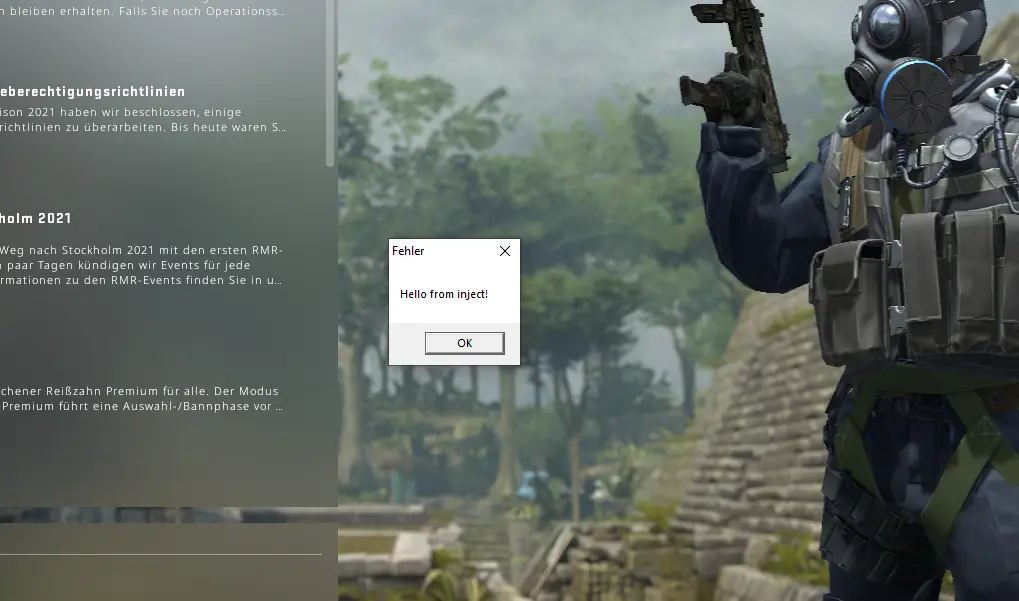
So everything seems to work now!
Using APC injection / hooking to avoid CreateRemoteThread
Since one could easily hook CreateRemoteThread in an attempt to monitor thread creations it would be better to avoid calling it. One could use QueueUserAPC() for example if there is a thread in our target process that enters an alertable state. I like this resource for it. Or simply setup a hook for a frequently called function in our target to get the job done. There are probably thousands of ways to do it and most of them being more stealthy than simply creating a new thread.
In particular, since I injected into csgo.exe, VAC hooks CreateRemoteThread as one can read here.
Code
I uploaded the code to Github here