Tutorial: Writing a Manual Mapper part 1
This guide covers knowledge about PE-Format that we need to write a manual dll mapper, which loads a dll into another processes memory. The next guide covers how to actually implement it.
Preface
What is a manual mapper? A manual mapper is a tool used to manually load a DLL into another processes memory without calling the Windows API function LoadLibrary(). This tutorial will cover how such a manual mapper works by first explaining the related PE-Format structures for an x86 machine and then showing how to actually implement this in C++ using the Windows API. If you are interested in the implementation you can skip to the next Part of this series.
DOS-Header
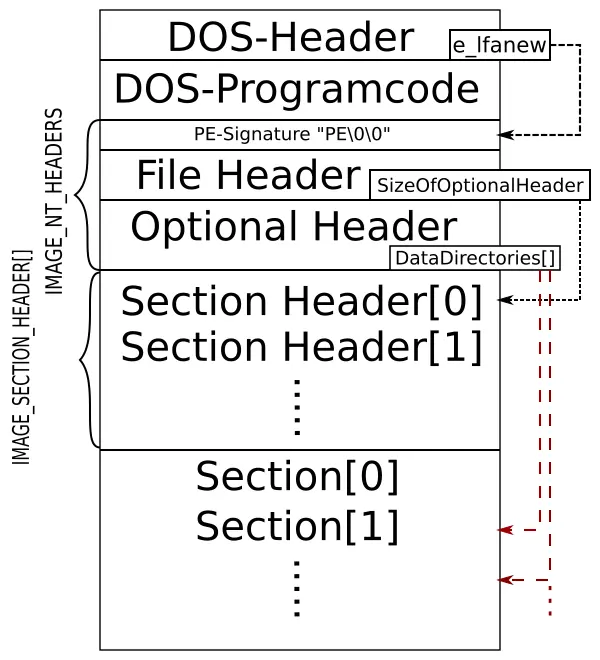
The beginning of an .exe/.dll-file is similar and consists of DOS-Header. This is kind of ancient and the purpose is that the .exe/.dll-file can run under MS-DOS to print out something like "This program cannot be run in DOS mode.". This MS-DOS program is stored directly after the DOS-Header which has a size of 64 Bytes. The only important property for us (under Windows) is the beginning which should contain "MZ" or "4D 5A" in hex, which identifies it as an executable or dll and the e_lfanew field which is the offset inside the file for the “new” File header that Windows uses. We need this pointer since the DOS-program that follows our DOS-Header has variable size. Just so that you get an idea of how the PE-Format roughly looks like. Here is an image I drew:
NT-Header
As you might see from the picture the e_lfanew is actually an offset to the PE-Signature which is 4 bytes in size in Windows and precedes the File Header. If we had loaded our file into a buffer and wanted to access the File Header or Optional Header we would do it like this:
dosHead = (IMAGE_DOS_HEADER*)buffer;
IMAGE_NT_HEADERS* PEHeader = (IMAGE_NT_HEADERS*)((DWORD)dosHead + dosHead->e_lfanew);
And the structure IMAGE_NT_HEADERS looks like this:
typedef struct _IMAGE_NT_HEADERS {
  DWORD                   Signature;
  IMAGE_FILE_HEADER       FileHeader;
  IMAGE_OPTIONAL_HEADER32 OptionalHeader;
} IMAGE_NT_HEADERS32, *PIMAGE_NT_HEADERS32;
FileHeader
So let’s take a closer look at the FileHeader. It is defined as follows:
typedef struct _IMAGE_FILE_HEADER {
  WORD  Machine;
  WORD  NumberOfSections;
  DWORD TimeDateStamp;
  DWORD PointerToSymbolTable;
  DWORD NumberOfSymbols;
  WORD  SizeOfOptionalHeader;
  WORD  Characteristics;
} IMAGE_FILE_HEADER, *PIMAGE_FILE_HEADER;
We only need to worry about SizeOfOptionalHeader and NumberOfSections here. The Machine field could be checked too, it determines whether the image is compiled for x86, x64 or Intel Itanium but if we compile the dll ourselves this should match anyway. Thus I will ignore it.
The SizeOfOptionalHeader field is straightforward. It gives the size of the optional header. We need this value because we need to calculate where the optional header ends because that’s where the Section_Headers[] array begins.
The NumberOfSections field tells us how many sections the image has. Those are containers for code, data, resources and more which can get mapped into memory by the loader. Each of them can have its own properties which we will see later.
Optional Header
The OptionalHeader is a large structure. It’s defined like:
typedef struct _IMAGE_OPTIONAL_HEADER {
  WORD                 Magic;
  BYTE                 MajorLinkerVersion;
  BYTE                 MinorLinkerVersion;
  DWORD                SizeOfCode;
  DWORD                SizeOfInitializedData;
  DWORD                SizeOfUninitializedData;
  DWORD                AddressOfEntryPoint;
  DWORD                BaseOfCode;
  DWORD                BaseOfData;
  DWORD                ImageBase;
  DWORD                SectionAlignment;
  DWORD                FileAlignment;
  WORD                 MajorOperatingSystemVersion;
  WORD                 MinorOperatingSystemVersion;
  WORD                 MajorImageVersion;
  WORD                 MinorImageVersion;
  WORD                 MajorSubsystemVersion;
  WORD                 MinorSubsystemVersion;
  DWORD                Win32VersionValue;
  DWORD                SizeOfImage;
  DWORD                SizeOfHeaders;
  DWORD                CheckSum;
  WORD                 Subsystem;
  WORD                 DllCharacteristics;
  DWORD                SizeOfStackReserve;
  DWORD                SizeOfStackCommit;
  DWORD                SizeOfHeapReserve;
  DWORD                SizeOfHeapCommit;
  DWORD                LoaderFlags;
  DWORD                NumberOfRvaAndSizes;
  IMAGE_DATA_DIRECTORY DataDirectory[IMAGE_NUMBEROF_DIRECTORY_ENTRIES];
} IMAGE_OPTIONAL_HEADER32, *PIMAGE_OPTIONAL_HEADER32;
It also contains more fields that are important for our manual mapper. Those are ImageBase, AddressOfEntryPoint, SizeOfImage and DataDirectory[]. Again we could also check Magic which is "PE32+" for 64bit and "PE32" for 32 bit but again, we wrote the dll we inject so I skip this. The rest shall not interest us here. You can check on the meaning of each field here.
The ImageBase describes the preferred base of the image. This means where the image can be loaded without relocation. What relocation is you might ask. Let’s say you have the following code snippet:
char *foo = "bar";then the string literal "bar" will be stored in your .data section. Consequently the pointer-variable *foo must point to its beginning once the image is loaded. If we know where the image will start in memory we also know where this beginning will be at compile time since it’s always mapped to the same offset from the ImageBase. But if the image moves, i.e., gets another base address than the one in ImageBase, we have to correct the address that *foo stores. That correction is called relocation. We will address relocation later on when we get to the relocation table.
AddressOfEntryPoint is the offset from the image base at which our Program starts. Once Windows finished loading the image and setting up the context (stack and stuff like that) of our Program it passes execution to this point.
SizeOfImage is the size the loaded image needs in memory. This will be what we have to allocate when manual mapping the dll.
DataDirectory is an array of a whole lot of interesting structures. For example the “Export table” at index 0, “Import table” at index 1, “Base relocation” at index 6 and so on. The default value for IMAGE_NUMBEROF_DIRECTORY_ENTRIES is 16.
DataDirectories
Let’s dig a little deeper into what DataDirectory[] actually stores. Pretty simple actually:
typedef struct _IMAGE_DATA_DIRECTORY {
    DWORD   VirtualAddress;
    DWORD   Size;
} IMAGE_DATA_DIRECTORY, *PIMAGE_DATA_DIRECTORY;
The VirtualAddress stores the relative virtual address (RVA) from the image base for the beginning of the corresponding table. The Size stores the table’s size in bytes.
The tables themselves are very different from each other. We will look at the “Import Directory Table” and “Base Relocation Table” because those are relevant to our mapped image. Usually we should be fine with only those two. Anyway a full list can be found here.
Import Directory Table
The Import Directory Table is described by DataDirectory[1] and the corresponding VirtualAddress points to an array of structures IMAGE_IMPORT_DESCRIPTOR which is terminated by one struct filled with NULL. In the winnt.h this struct is defined like:
typedef struct _IMAGE_IMPORT_DESCRIPTOR {
union {
        DWORD   Characteristics;
        DWORD   OriginalFirstThunk;
    } DUMMYUNIONNAME;
    DWORD   TimeDateStamp;
    DWORD   ForwarderChain;
    DWORD   Name;
    DWORD   FirstThunk;
} IMAGE_IMPORT_DESCRIPTOR;
typedef IMAGE_IMPORT_DESCRIPTOR UNALIGNED *PIMAGE_IMPORT_DESCRIPTOR;
We are interested in FirstThunk and Name. But you can check on the other fields here if you like.
The Name field holds a RVA to a NULL-terminated ASCII string which contains the DLL’s name from which we want to import functions.
The FirstThunk points to an array of the following structure defined in winnt.h (I chose the 32bit version here):
typedef struct _IMAGE_THUNK_DATA32 {
    union {
        DWORD ForwarderString;
        DWORD Function;
        DWORD Ordinal;
        DWORD AddressOfData;
    } u1;
} IMAGE_THUNK_DATA32;
The array is terminated with a structure containing only NULL. It is often called the Import Address Table (IAT). Before the IAT is processed by the loader this array contains an ordinal or a RVA to an IMAGE_IMPORT_BY_NAME struct for each imported function. We can determine which is the case by examining the highest bit of this struct (i.e., AddressOfData & 0x80000000). If it is set we have an ordinal number which is simply an index into the Export directory table of the dll. Otherwise it points to IMAGE_IMPORT_BY_NAME:
Again I could only find a definition in winnt.h:
typedef struct _IMAGE_IMPORT_BY_NAME {
  WORD  Hint;
  BYTE  Name[1];
} IMAGE_IMPORT_BY_NAME,*PIMAGE_IMPORT_BY_NAME;
The Hint is also an ordinal number. If it’s present and correct the loader can find the function faster. If not it will search the Export directory table for the given name which is pointed to by Name and NULL-terminated. I don’t know why they declared it as a byte array of size 1 though… Technically this makes of course no difference.
Now on disk OriginalFirstThunk points to an array with the same content as FirstThunk but when the imports got resolved by the loader, the elements of FirstThunk will instead contain a Function address of the function in memory. This is what we have to do in our manual mapper.
All in one picture:

Base Relocation Table
The Base Relocation Table is described by DataDirectory[5] and references a structure IMAGE_BASE_RELOCATION which is defined as:
typedef struct _IMAGE_BASE_RELOCATION
{
  DWORD VirtualAddress;
  DWORD SizeOfBlock;
} IMAGE_BASE_RELOCATION,*PIMAGE_BASE_RELOCATION;
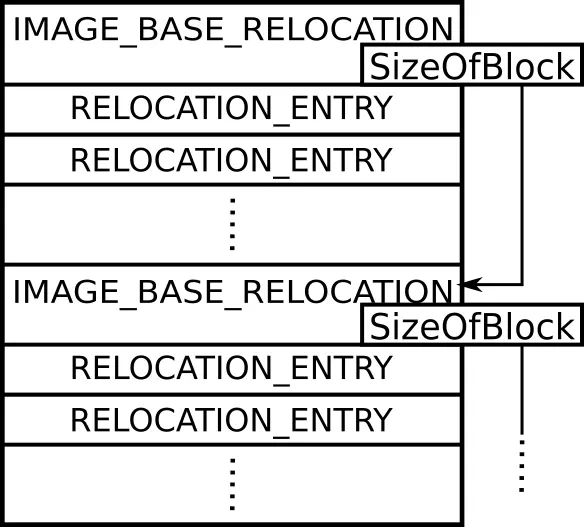
It is followed by multiple words (2 bytes) that each represent a relocation. I will call them relocation entries. The amount of relocation entries that follow is given by SizeOfBlock which gives the bytes these entries occupy. The VirtualAddress stores a RVA from the image base which is added to each Offset in the relocation entries.
Since I couldn’t find a structure to represent these relocation entries I wrote one to access the content in a nicer way:
typedef struct _RELOCATION_ENTRY
{
  unsigned Type : 4;
  unsigned Offset : 12;
};
The Type consists of the top 4 bits. It defines what kind of fix should be applied. For example on a 32bit machine one Type requires only fixing the higher 16 bits. You can check them out here. I will only check for the type 0-3 in my implementation of a manual mapper though there might be some special cases where this is not enough…
The Offset consists of 12 bits. As explained before it is added to the VirtualAddress + image base to get the address of the location to fix. How do we fix it you might ask. Pretty simple, if the image moved we subtract the preferred ImageBase and add the actual one.
After the relocation entries can come another IMAGE_BASE_RELOCATION which has to start at a multiple of 32 bits. Thus it is sometimes preceded by padding entries which we can identify by the Type of 0. This next IMAGE_BASE_RELOCATION again contains a SizeOfBlock of blocks and is also followed by relocation entries.
But how do we know that there is no IMAGE_BASE_RELOCATION to follow? How can we find the end? One way would be this:
reloc_end = imageNtHeaders->OptionalHeader.DataDirectory[IMAGE_DIRECTORY_ENTRY_BASERELOC].VirtualAddress
+ imageNtHeaders->OptionalHeader.DataDirectory[IMAGE_DIRECTORY_ENTRY_BASERELOC].Size
Again an image speaks more than a thousand words so here is one:
Section Table
Until now we didn’t explain how anything is actually written into memory. This is what the sections are for. They are containers for code, data and more that can get mapped into memory.
As we saw before our Section_Headers[] start right where the OptionalHeader ends. We can get this address like this:
NT-Header = (IMAGE_NT_HEADERS*)((DWORD)dosHead + dosHead->e_lfanew);
IMAGE_SECTION_HEADER Section_Headers[] =
(IMAGE_SECTION_HEADER*)((DWORD)&NT-Header->OptionalHeader+NT-Header->FileHeader.SizeOfOptionalHeader);
Where dosHead simply points to the buffer that holds the content of our dll in our manual mapper (remember the buffer begins with the DOS-Header).
We have the size of this array given by NumberOfSections from before so we can iterate through the array. What does each entry hold? Well it’s defined like:
typedef struct _IMAGE_SECTION_HEADER {
  BYTE  Name[IMAGE_SIZEOF_SHORT_NAME];
  union {
    DWORD PhysicalAddress;
    DWORD VirtualSize;
  } Misc;
  DWORD VirtualAddress;
  DWORD SizeOfRawData;
  DWORD PointerToRawData;
  DWORD PointerToRelocations;
  DWORD PointerToLinenumbers;
  WORD  NumberOfRelocations;
  WORD  NumberOfLinenumbers;
  DWORD Characteristics;
} IMAGE_SECTION_HEADER, *PIMAGE_SECTION_HEADER;
We are interested in VirtualAddress, PointerToRawData, SizeOfRawData and Misc.VirtualSize. The Name is not so interesting because we don’t care what the section is named (for example ".text"), we just want to know what goes where and what properties to set.
Also since we load and relocate every section we don’t care about PointerToRelocations and NumberOfRelocations. You can check out all fields here.
VirtualAddress describes the RVA from the image base of the section.
PointerToRawData is the Offset in the file on disk.
SizeOfRawData is the size of it on disk and VirtualSize is the size when loaded in memory.
Why can they differ? If your section contains only declared but uninitialized static variables then on disk there is no value stored but we need the space in memory so SizeOfRawData < VirtualSize but the opposite can also happen. In the documentation they say SizeOfRawData “must be a multiple of the FileAlignment” which usually is 512 bytes but VirtualSize doesn’t have to be. So if our section holds just a few initialized values and is then filled with padding to be a multiple of 512 bytes in size on disk then SizeOfRawData is 512 bytes but VirtualSize might be smaller.
With this information we should now be ready to actually copy the sections into the target processes memory in part 2.