Model E1337 - Rolling Code Lock
Writeup for the CTF challenge Model E1337 - Rolling Code Lock from Hacker101.
Hints
Flag0 — Found
- Hidden functionality is good functionality
- Comments can often reveal important things
- XML from untrusted sources must be processed carefully
- This application runs on the uwsgi-nginx-flask-docker image
Flag1 — Found
- Lock codes must be deterministic
- All random numbers are not made equally
- There is a way to get the source code
- Brush up on your bitwise operators
Starting Off
Initially the challenge starts with a very simple website. We have an input field which we can submit with an unlock button. If we press the button we make a Post request to /unlock. If we enter anything but digits we get an Internal Server Error. Otherwise the website tells us what number it expected us to enter which is an 8 digit number every time.
After typing a few different paths into the URL or launching gobuster we find that there exists an /admin page. Unfortunately this one is also super simple and only tells us where the “Lock location” is which is “Front door”. Examining the source code of this site we see that there is a comment:
<!-- We should be using get-config for this on the client side. -->Googling for get-config did not yield anything useful. But plugging it into the URL gets us to the page /get-config. This website is even more simplistic. It says “Front door”. But the source code reveals that /get-config actually gives an xml-file:
<?xml version="1.0" encoding="UTF-8"?><config><location>Front door</location></config>Hmm strange… But if there is a get-config maybe there also is a set-config. Indeed /set-config which tells us we made a bad request. Well setting something without giving parameter surely makes few sense so let’s try to add a parameter. After trying around a bit I found that "data" is the correct get parameter we have to set. We could also find it with gobuster using:
gobuster fuzz -u http://base-url/set-config?FUZZ -w wordlistOkay putting it all together. /get-config gives us an XML-file with a <location>-node. It appears that this content is used in the admin page to display to us “Front door”. Let’s try to set the config to
<?xml version="1.0" encoding="UTF-8"?><config><location>test</location></config>to prove that we are right. Indeed the admin page displays “test” now.
XXE
A well known vulnerability that can happen in XML is XXE. We can sometimes use XML entities to read system files. This is because we can set variables inside an XML document using Document Type Definition. This can be done like this:
<!DOCTYPE foo [ <!ENTITY xxe SYSTEM "file"> ]><location>&xxe;</location>!DOCTYPE foo defines the doctype of our XML-file and <!ENTITY xxe SYSTEM "file"> says that we want an entity called xxe which is the content of “file”. This variable can then be referenced with &xxe from our XML-file. The only question now is: What do we want to read?
I used the tip here that our application runs with “uwsgi-nginx-flask-docker”. A short search for this reveals that there is a file /app/uwsgi.ini to configure our main module. This doesn’t exist though but uwsgi.ini does and it tells us that the main module is “main” thus there must be a main.py. Let’s read this one. BUT since we have special characters like ! and & in our URL then we have to encode our parameter first with URL-encoding. Jackpot it works. We get the code snippet that is responsible to unlock the website given the correct input:
from flask import Flask, abort, redirect, request, Response, session
from jinja2 import Template
import base64, json, os, random, re, subprocess, time, xml.sax
from cStringIO import StringIO

from rng import *

----------------------------CUT---------------------------------

@app.route('/unlock', methods=['POST'])
def unlock():
   code = int(request.form['code'])
   cur = next(26)
   time.sleep(5)

   if code == cur:
      return 'Unlocked successfully.  Flag: ' + flags[1]
   else:
      return 'Code incorrect.  Expected %08i' % cur
----------------------------CUT---------------------------------
I have cut out the irrelevant parts for brevity. Hmm weird next(26) throws an error if I try to run it on my machine. Maybe it’s imported from rng. Since rng is not built in, there could be another file rng.py. This is the case and its contents are:
def setup(seed):
   global state
   state = 0
   for I in xrange(16):
      cur = seed & 3
      seed >>= 2
      state = (state << 4) | ((state & 3) ^ cur)
      state |= cur << 2

def next(bits):
   global state

   ret = 0
   for I in xrange(bits):
      ret <<= 1
      ret |= state & 1
      state = (state << 1) ^ (state >> 61)
      state &= 0xFFFFFFFFFFFFFFFF
      state ^= 0xFFFFFFFFFFFFFFFF

      for j in xrange(0, 64, 4):
         cur = (state >> j) & 0xF
         cur = (cur >> 3) | ((cur >> 2) & 2) | ((cur << 3) & 8) | ((cur << 2) & 4)
         state ^= cur << j

   return ret

setup((random.randrange(0x10000) << 16) | random.randrange(0x10000))
Now we see that every time the server starts up it generates a random seed and calculates a 64-bit state from this number:
setup((random.randrange(0x10000) << 16) | random.randrange(0x10000))If we then want to unlock the website next(26) is used to generate a pseudo-random number from the state. Also the state is changed by this function. Our only chance to succeed is predicting this number somehow.
Doing the Math
To crack the lock we have to calculate what the future pseudo-random numbers will be given the previous numbers which we can get from our website.
The next() Function
Let’s first analyze the next function. Initially ret is set to 0. Then we have “bits” inner iterations. In each iteration we push the lowest bit of state to the right of ret. After this the state is changed by multiple operations. My initial approach was to simply name each bit of my state: “abcd…xyzABC…XYZ0…9?!” and calculate how this would change. I hoped that something would cancel and we ended up with an easy equation but that was not the case. It quickly got too complicated to keep track of.
But what I found this way was how the inner loop worked. It only changes 4 bits of the state at a time and then moves on to the next 4 bits. If we name these 4 bits ABCD we find that it replaces them with (A^D)(B^D)(C^A)(D^A). So if our state was say ABCDEFGH… then it changes to (A^D)(B^D)(C^A)(D^A)(E^H)(F^H)(G^E)(H^E)…
Now with that in mind we see that we can simply remove the line state ^= 0xFFFFFFFFFFFFFFFF from our next() function because (A^1^D^1) = (A^D) and similar for every other pair. Furthermore we note that state &= 0xFFFFFFFFFFFFFFFF simply cuts off the 65th bit which we could get by (state<<1).
A More Sophisticated Approach
As I mentioned the previous approach quickly got too complicated. A more sophisticated approach is to imagine our state to be a bitvector of dimension 64 with the first component being the 64-th bit, the second one the 63-rd and so on. Let’s call our state’s bit vector b. Also notice that we have:
A^B = (A+B)%2, A^B^C = (A+B+C)%2 and so on.
With this in mind we can represent our operations by 64x64 matrices which we multiply with our bitvector and take modulo 2 of the result in each component. The first two representations would look like this:
---(state << 1)----     ---(state >> 61)---
0 1 0 0 0 ... 0 0 0     0 0 0 0 0 ... 0 0 0
0 0 1 0 0 ... 0 0 0     0 0 0 0 0 ... 0 0 0
0 0 0 1 0 ... 0 0 0     0 0 0 0 0 ... 0 0 0
.   .   .   .   .       .   .   .   .   .
.   .   .   .   .       .   .   .   .   .
.   .   .   .   .       .   .   .   .   .
0 0 0 0 0 ... 0 1 0     1 0 0 0 0 ... 0 0 0
0 0 0 0 0 ... 0 0 1     0 1 0 0 0 ... 0 0 0
0 0 0 0 0 ... 0 0 0     0 0 1 0 0 ... 0 0 0
Note that if we take mod 2 after adding, this is exactly xor and so on the space of whole numbers module 2 (mathematically ), the + operator is the same as the ^ operator.
Next if we call these previous two matrices A and B then as long as b only contains 0 and 1 we also have:
In the same way as before we can represent the inner for-loop of next() as a matrix C operating on our bitvector b and can then describe a full outer for loop with:
So let’s set then describes a full outer loop of the next function.
What does this yield to us? We now know, given an initial state, how we can calculate the state after any number of outer iterations. Furthermore since ret is actually returned to us by the function next() we know what it is after 26 iterations because the website will give this number to us. But the n-th bit of ret is the lowest bit of state after n iterations (counting the bits starting from 0). So we know:
- How we can calculate the lowest bit of state for any given number of iterations from the initial state
- And what it actually is after the number of iterations
So we have a system of equations which we can maybe solve using gaussian elimination. It looks somewhat like this:

On the right we have the bits of ret in each iteration and on the left we have which of the initial state’s bits need to be xored to get this result. But the classical gauss works with addition not with xor. In our case we have not . Thus I implemented the gaussian elimination for xor. Hoping that this was enough I generated a whole lot of variables until I had more than 150 equations but the system kept being unsolvable… This means we need to find more relations but where? Well the only place we did not look yet is the setup() function.
The setup() Function
The setup function starts by setting state to 0 and then does the following:
for I in xrange(16):
      cur = seed & 3
      seed >>= 2
      state = (state << 4) | ((state & 3) ^ cur)
      state |= cur << 2
Analyzing this we find that given a previous state prev_state our state after one iteration will be the prev_state bits concatenated with the lowest two seed bits concatenated with the lowest two seed bits xored with the lowest two prev_state bits. To illustrate this we can say:
state = prev_state | seed[0:1] | seed[0:1] ^ prev_state[0:1]furthermore our seed will be shifted 2 to the right for the next iteration.
From this we can derive more equations. Let’s say we call the first bits of state ABCD then we get:
and for the following 4 bits EFGH we get:
And similar for every following 4 bits.
This yields us the following equations that our initial state fulfills by construction:
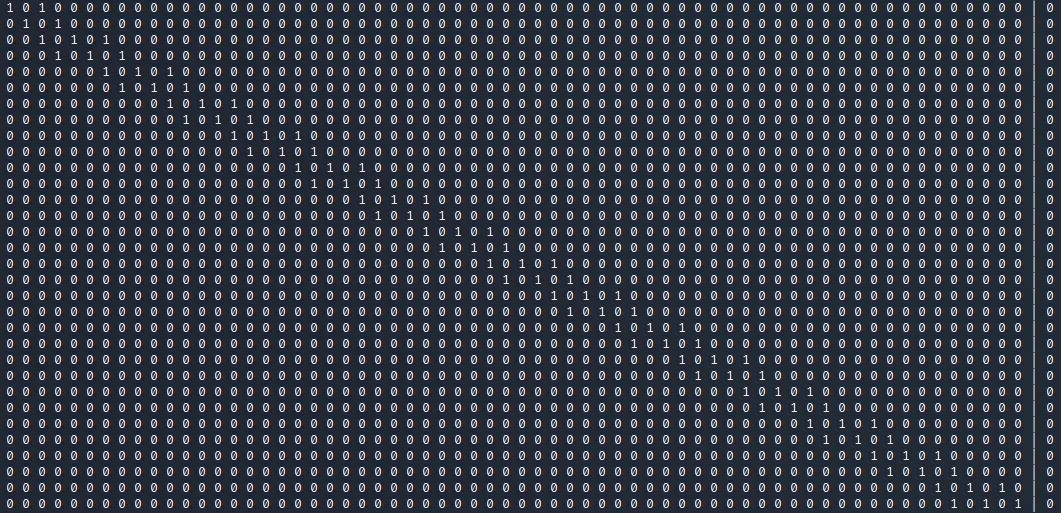
If we add these to our system of equations we can predict the initial state with only 2 variables from the website. Knowing the initial state we can then call next(26) as often as we want and predict what the website will spit out in the future. Thus we can enter the correct value to unlock the lock.
Python Code
Since the code I used for solving is a little longer I uploaded it to github. You can check it out here if you have problems programming it.