Creality K1 CFS improved purging
How the Creality CFS works and how to retrude before cutting the filament so reduce waste.
Introduction
The Creality K1 is a nice printer. However the same cannot be said about the CFS upgrade kit. It is poorly developed and intransparent. Also Creality breached the GPLv3 license by not providing the source code of the CFS binaries inside /klipper/klippy/extras.
Because of this i reverse engineered their binary and did this mod for improved purging. The mod can be downloaded from my GitHub here.
What the mod does
Besides fixing some of their bugs, this mod mainly allows you to retrude filament before the filament is cut to save around 30mm of filament on each filament change. It also implements all of its functions in klipper macros so it is transparent and easy to modify.
Controlling the buffer on the back
Before this mod, it was not known how to control the buffer on the back. When retruding before the cut, the CFS will just block and the extruder gears will skip. Thus people came up with for example this mod. It added a second buffer to the setup that will allow a certain extra mount to be retruded before the filament is cut. Not quite as much as with this mod but still some. However i could not get it to work reliably.
This mod now enables you to control the buffer on the back directly. The single line that allows you to retrude before cutting is actually just:
BOX_RETRUDE_PROCESS ADDR=<Box_Address> NUM=<Slot_number> TRIGGER="BUFFER"However there are quite some caveats to it which i explain here.
How the buffer works
The buffer on the back has three states: ,,empty”, ,,middle” and ,,full”.
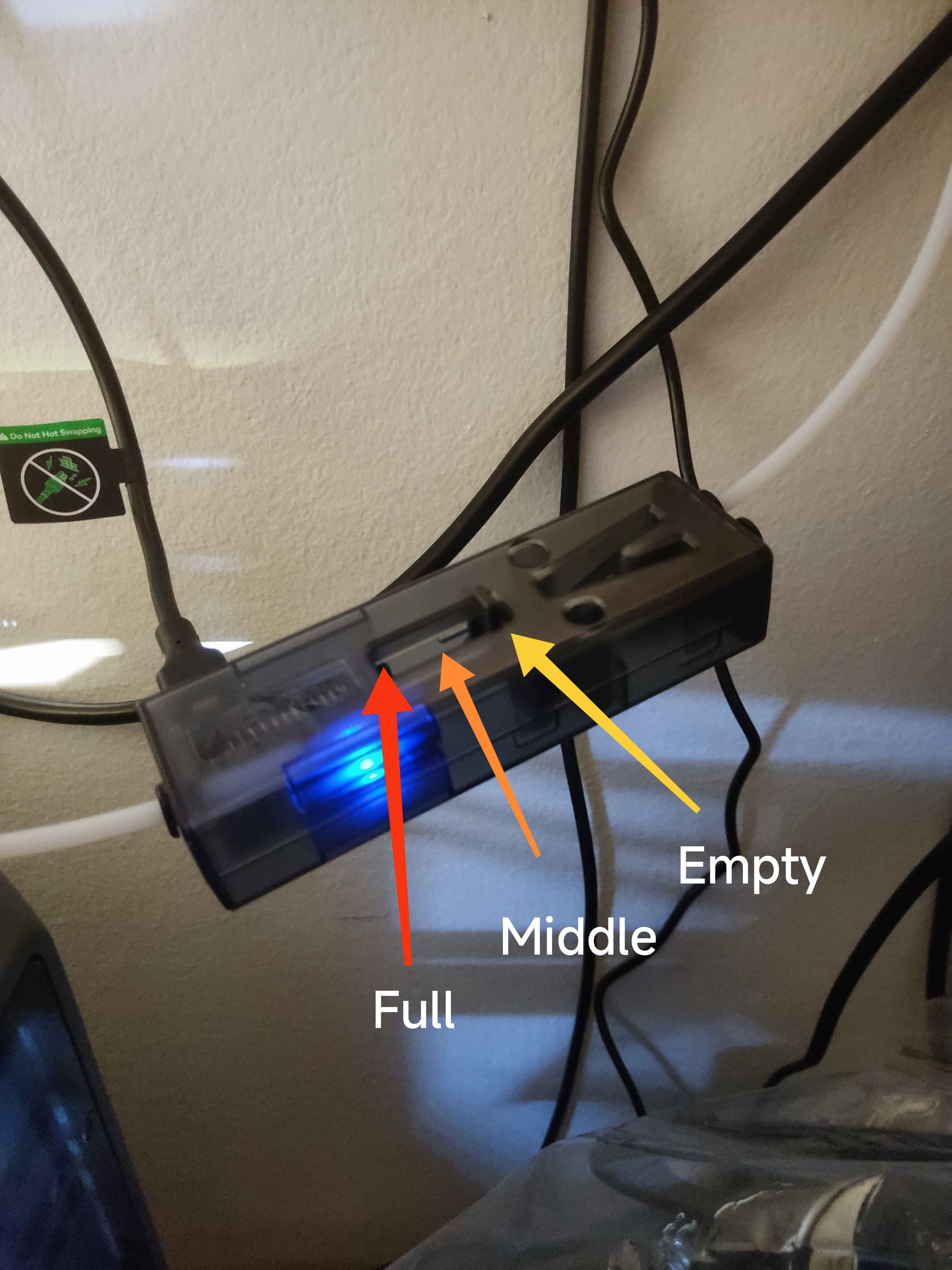
,,full” means that there is filament ready to be extruded in the buffer. That means the spring inside of it will allow you to extrude exactly 20mm. After that the spring is completely relaxed and the state will be ,,empty”. You can refill the buffer with BOX_RETRUDE_PROCESS. The same is true for the converse. If the buffer state is ,,empty” and we retrude 20mm, the spring will tension until it reaches its maximum position at 20mm retrustion. Then the state will indicate ,,full”. To allow further retrusion, we need to call:
BOX_RETRUDE_PROCESS ADDR=<Box_Address> NUM=<Slot_number> TRIGGER="BUFFERHere Box_Address is just the number of the CFS box you are using starting with index 0 (you can have up to 4) and NUM is the filament spool inside of it that is currently loaded starting at 0 (also up to 4). This command lets the CFS physically retrude 20mm and thus the buffer moves from the ,,full” state back to ,,empty” allowing further retrusion.
One major caviat however is that you can not just call this macro whenever you want, this most likely throws an error. You first have to set the box into IDLE mode. This can be done with
BOX_SET_BOX_MODE ADDR=<Box_Address> MODE="IDLE"This mode disables, besides other things, that the CFS box handles the buffer state (the frequent flushing of it that you hear during printing). Thus this mode allows you to control it manually. So to now allow an arbitrary retrusion without tensioning the PTFE tube at all we can do this
{% set buffer_len = 2*buffer_empty_len %}
{% set loops = (pre_cut_retrusion // buffer_len) | int %}

BOX_SET_BOX_MODE ADDR={cur_slot[1]} MODE="IDLE"

{% for i in range(loops) %}

  BOX_RETRUDE_PROCESS ADDR={cur_slot[1]} NUM="{cur_slot[2]}" TRIGGER="BUFFER"
  RESPOND MSG="Retruding: {buffer_len}"
  G91
  G1 E-{buffer_len} F{pre_cut_retrusion_speed*60}
  G90
  M400
{% endfor %}
This is exactly a snippet from my custom box.cfg on my GitHub. Its not so important where the addresses come from. The only thing to note is that we flush the buffer every 2*buffer_empty_len millimeters. Why 2*? Thats Crealities weird logic. They used it like that inside their binary and set the variable in the [box] section to 10mm by default so it did the same.
Preloading
The snippet i just gave you will work already almost all of the time. There is just a tiny caveat still here. It puzzled me for very long what they ment with Preloading in their binary. After testing a lot it found out what it is.
Preloading is the mechanism that happens when you plug in a new spool into the CFS. If you are not printing while you do that, the CFS should pull in you filament, move the spool back and forth and after that extrude all the way to the printhead. Then immediately retrude again.
This is Preloading. If somebody ever put in a spool into the CFS and then immediately rushed to issue the command BOX_RETRUDE_PROCESS that could cause problems. Thus we have to wait if there is preloading happening. I wrote a custom snippet for that which queries the state of the CFS and makes sure that we are not preloading when we control the buffer. This reads as follows and is more complicated than the actualy logic for the retrusion above.
[gcode_macro GET_MODE]
description: Get and store human-readable mode from T1–T4 in printer['box']
variable_mode_str: ""
gcode:
    {% set tnum = params.T|int %}
    {% if tnum not in [1,2,3,4] %}
        {action_respond_info("Invalid parameter. Use T=1..4")}
    {% else %}
        {% set MODE_ENUM = {
            "0": "IDLE",
            "1": "PRELOADING",
            "2": "PRINTING",
            "3": "WRAPPERING",
            "4": "ERR",
            "5": "TEST"
        } %}
        {% set box = printer['box'] %}
        {% set key = "T" ~ tnum %}
        {% set raw_mode = box[key]["mode"]|string %}
        {% set mode_str = MODE_ENUM.get(raw_mode, "UNKNOWN") %}
        SET_GCODE_VARIABLE MACRO=GET_MODE VARIABLE=mode_str VALUE="{% raw %}'{{ mode_str }}'{% endraw %}"
        #{action_respond_info(key ~ " mode = " ~ mode_str)}
    {% endif %}

[gcode_macro CHECK_PRELOADING]
description: Check if any of T1–T4 is in PRELOADING mode and save result
variable_any_preloading: False
gcode:
    {% set box = printer['box'] %}
    {% set preloading = False %}
    {% for t in [1, 2, 3, 4] %}
        {% set mode = box["T" ~ t]["mode"]|string %}
        {% if mode == "1" %} ; 1 = PRELOADING
            {% set preloading = True %}
        {% endif %}
    {% endfor %}

    SET_GCODE_VARIABLE MACRO=CHECK_PRELOADING VARIABLE=any_preloading VALUE={preloading}
    {action_respond_info("Any preloading: " ~ preloading|string)}
and then we check for it like this
  CHECK_PRELOADING
    {% set is_preloading = printer["gcode_macro CHECK_PRELOADING"].variable_any_preloading %}
    {% if is_preloading %}
      {% for i in range(max_wait_for_preload) %}
        {% if is_preloading %}
          G4 P1000 # wait a second
          CHECK_PRELOADING
          {% set is_preloading = printer["gcode_macro CHECK_PRELOADING"].variable_any_preloading %}
        {% else %}
          {% set preloading_finished = True %}
        {% endif %}
      {% endfor %}

      {% if is_preloading %}
        {action_raise_error("Preloading seems to have failed. Is something jammed?")}
      {% endif %}
    {% endif %}
Orca Slicer
Finally i want you to understand why we need to configure the g-code Change filament G-code and Machine start G-code. The intial retraction should flush filament. The Change filament G-code is set to
T{next_extruder} LEN={if purge_in_prime_tower}0{else}{second_flush_volume/2.405279844}{endif} RETRACT={new_retract_length_toolchange} PRERETRACT={old_retract_length_toolchange}We tell the change filament macro how much to purge with LEN. If we have a purge_in_prime_tower enabled, the slicer thinks, that it will do all purging. Thus we purge nothing in that case. Otherwise we purge second_flush_volume which is the flush volume after the filament reaches the nozzle. We divide here by according to simple volume formulas. The second change we make is in the
Machine start G-code. Here we do
T{initial_extruder} LEN=40 RETRACT=0 PRERETRACT=0Since orca expects the first filament to be loaded when the print starts. Creality however does not implement this and so we ensure it is loaded and purged with a hardcoded purge of 40mm.
Summary
This is pretty much the whole mechanism. The box.cfg implements some more logic to compensate for Orca Slicers retraction and extrusion before and after filament change but this is really just minor and depending on what you want to do, you don’t need to mess with this. If you are interested in more details or have question, you can ask me. Hope this helps you. If you are interested in how i reversed their binaries, check out Reverse Engineering Cython Binaries.